Affiliate links on Android Authority may earn us a commission.Learn more.
Raspberry Pi 3 review
June 27, 2025
There are several key things that have helped make the Raspberry Pi such a success. They include its feature set (like the GPIO pins), its ease of access, and its price. And it seems that this last point is a core value for the Raspberry Pi foundation. Over the last few years the foundation has either made new boards which are even cheaper (like the Pi Zero) or it has increased the performance and functionality of the boards, while retaining the same price. The Raspberry Pi 3 falls into the latter category, a new board, with better performance and new features, but yet at the same familiar price.
The Raspberry Pi 3 is a natural and progressive upgrade from the Pi 2. Not only does it open the door to 64-bit computing because of its 64-bit Cortex-A53 based processor, but it also adds Wi-Fi and Bluetooth, two key features for the Internet of Things (IoT).

I ordered a Pi 3 on the day it was announced and I have been playing with it ever since it arrived. Is it a worthwhile upgrade? Is now the best time to buy your first Raspberry Pi? Let’s find out.
Read more:
Specifications
As with all Raspberry Pi boards, what you are buying is just a circuit board. A versatile and fully functional computer circuit board, but just a circuit board nonetheless. Of course there are a multitude of accessories including cases, touchscreens and cases with touchscreens, but for $35 what you get is the board. To use it you will need a microSD card, a keyboard, a mouse, and a TV or monitor with a HDMI port.
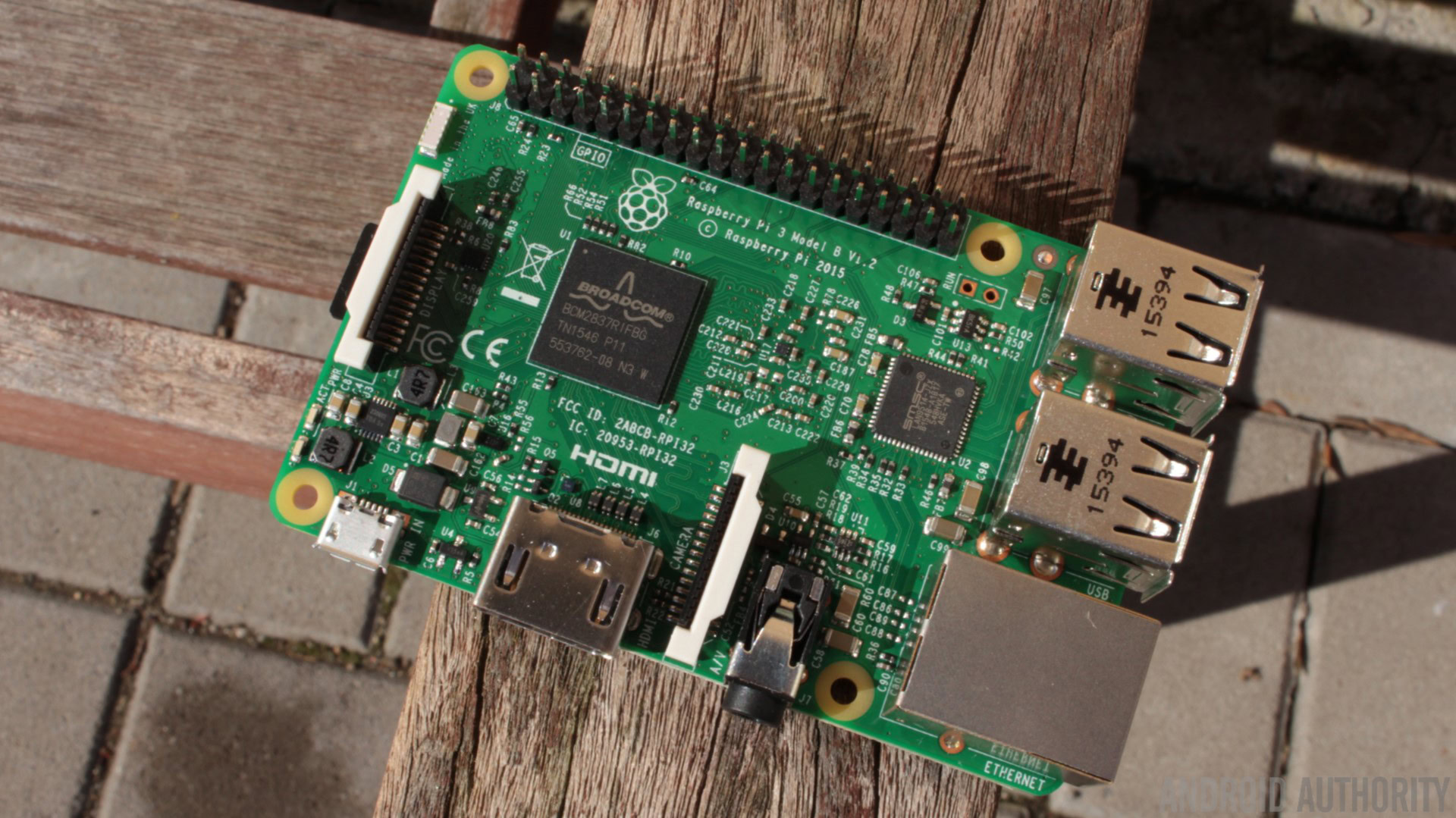
In the middle of the board is the black System-on-a-Chip (SoC) from Broadcom with the HDMI port below it and the USB ports, plus the Ethernet port, to the right. Along the top edge are the GPIO pins which are fully compatible with previous Pi boards. On the bottom of the board is the microSD slot which is used to store the OS and your data.

The board is powered via a 5V micro USB port, but unlike previous generations this one needs a bit more juice. It is now recommended that you use a 2.5A adapter if you want to connect power-hungry USB devices to the board.
There are three big changes to this new board that mean it earns the title “Pi 3” rather than something like “Pi 2+”. The first is the upgrade to 64-bits. The new board uses a 1.2GHz 64-bit quad-core Cortex-A53 ARMv8 based CPU from Broadcom. The new SoC, the BCM2837, keeps the same basic architecture as its predecessors, so any projects and tutorials which rely on the precise details of the Raspberry Pi hardware will continue to work.
The BCM2835 found in the Raspberry Pi 1 and the Raspberry Pi Zero contains a single core ARMv6 (i.e. and ARM1176) CPU and a VideoCore IV CPU. The BCM2836 keeps the same GPU core but replaces the ARMv6 CPU with a quad-core ARMv7 Cortex-A7 CPU. The new BCM2837 remains essentially the same as the BCM2836 but replaces the four 32-bit Cortex-A7 cores with four 64-bit Cortex-A53 cores.
The other two big changes are in the wireless department. For the first time the Raspberry Pi now has built-in Wi-Fi and Bluetooth. Both of these were previously available via USB dongles, however by including them on the board the Raspberry Pi foundation has throw down the gauntlet to all other would-be IoT developer boards. I can only hope that Wi-Fi and Bluetooth become a standard for all future Raspberry Pi boards. Anyone want a Raspberry Pi Zero+ with Wi-Fi and Bluetooth, even if it costs $15? Yes please! But I digress.
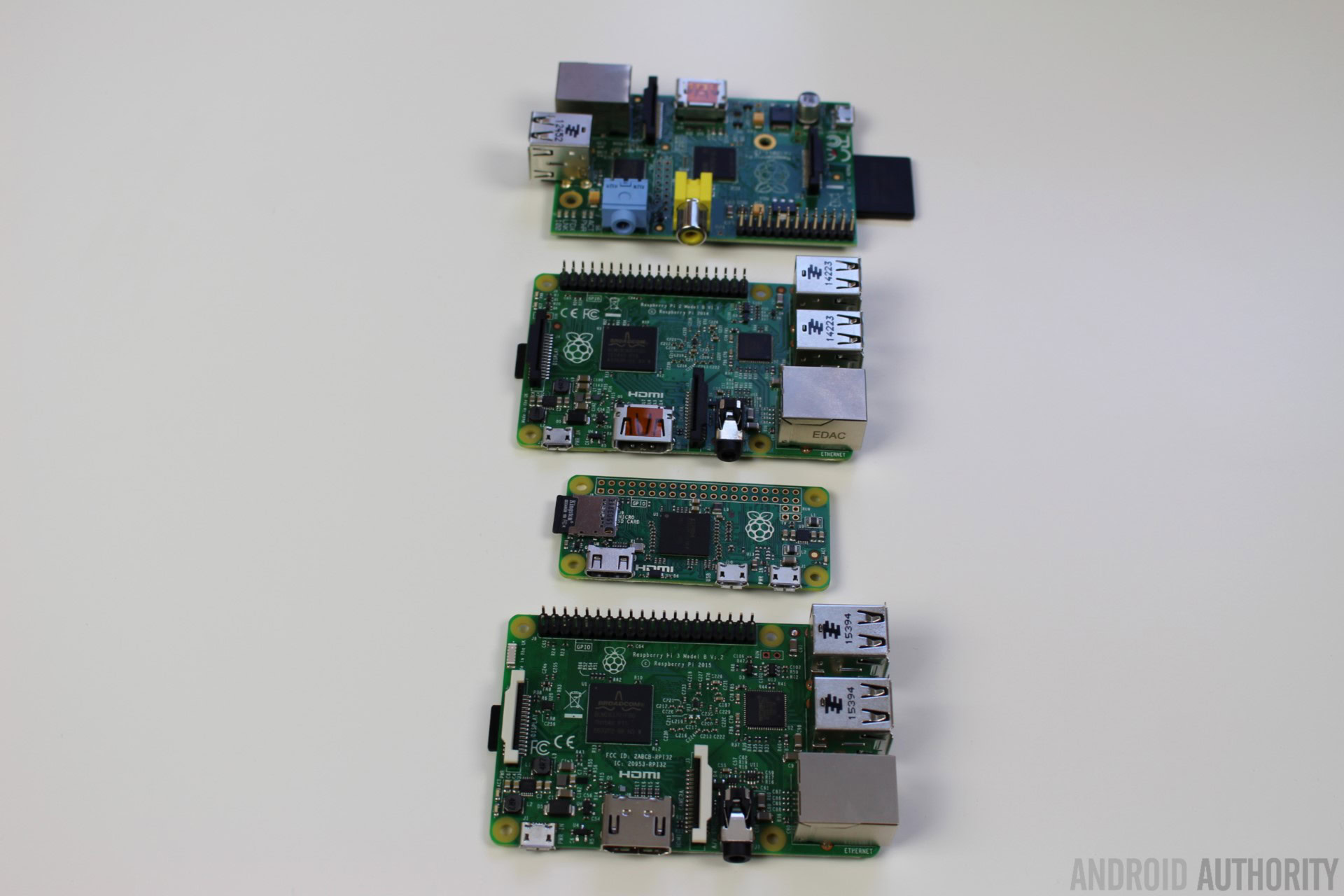
As for the rest of the hardware, it is basically unchanged from the Pi 2. You get the 40 General Purpose Input and Output (GPIO) ports, a 3.5mm audio jack, a digital camera interface and a display interface (not to be confused with the HDMI port).
Installing Raspbian is a breeze. You need todownload the New Out Of the Box Software (NOOBS) zip archiveand extract it onto a blank microSD card. Boot the Pi 3 from the card and follow the on screen instructions. Once complete the board will reboot into the Raspbian desktop environment.

When the desktop appears you will probably want to configure the networking, either Ethernet or Wi-Fi. To do this left-click on the network icon (near the clock at the top-right of the screen) and you will see a list of all available wireless networks. Select the one you want and enter the password. If you right-click the network icon and choose the “Wifi Networks (dhcpcdui) Settings” option from the pop-up menu, you can manually enter a static IP address and/or configure the wired networking.
With all this talk of 64-bit processors you might think that the software running in the Pi is also fully 64-bit… unfortunately not quite. Remember how you can install a 32-bit version of Windows or a 32-bit version of Linux on a 64-bit Intel desktop? Well, it is exactly the same with 64-bit ARM based processors. At the moment Raspbian is the 32-bit version both at the kernel level and for the userland tools (that means the command line tools and installed programs like the browser). In the future the Raspberry Pi foundation will look into releasing a 64-bit distro. If and when that happens it will likely happen in two stages, first a 64-bit kernel and 32-bit userland and then fully 64-bit. My guess is that the first 64-bit Raspberry Pi distros will come from Arch and CentOS and not from Raspbian. However while we wait, the 32-bit versions run perfectly well.
As well as Raspbian there are lots of other general Linux distributions that work with the Raspberry Pi3 includingArch Linux,CentOSandmany others. One of the specialist distributions is OSMC (the Open Source Media Center). It is based on Debian and boots straight into XBMC/Kodi, turning your Raspberry Pi into a Media Center.
I installed OSMC on my Pi 3 and booted it up. I then attached an external 2TB hard disk with some Full HD videos. I was able to find the files on the hard drive without any problems and I was able to watch the videos easily. My primary test file was a high bit-rate video that come straight out of Premiere Pro. The Pi 3 was able to play it without any lag or stutters.
So if you have a hard drive full of media and you want to access it from your lounge then you could use the Raspberry Pi 3!
Performance
Before we look at the actual performance numbers, lets look at the theoreticals. The Raspberry Pi 3 is clocked at 1.2GHz compared to the 900MHz of the Pi 2, so that is a 33% increase from the start. Plus the Cortex-A53 is a faster CPU core than the Cortex-A7, so theoretically the Pi 3 should be around 50-60% faster than the Raspberry Pi 2, which is roughly a factor of ten times faster than the original Raspberry Pi.
To test the relative speed of all the different Pi boards, I ran the “speed” test of the OpenSSL suite. These tests churn out lots of numbers however the data below should give you a feel for how the different boards compare. The ‘numbers’ are in 1000s of bytes per second processed:
According to these benchmarks the Raspberry Pi 3 is around 35% to 40% faster than the Raspberry Pi 2. It also seems to be around 3 to 4 times faster than the Raspberry Pi Zero (when comparing the single-core results to the multi-core results).
As for real world desktop performance, the Raspberry Pi 3 has certainly nudged the Pi a step closer to being a desktop alternative. Loading a webpage like AndroidAuthority.com is about twice as slow on the Raspberry Pi compared to a modern desktop, while launching a program like LibreOffice Writer is around 3 times slower. However the speeds achieved aren’t painfully slow. Using the Pi 3 as a desktop wouldn’t be optimum, however it is certainly do-able.
However, at the moment the real aim of the Pi 3 isn’t too replace the desktop, it is as a tool for hobbyists and educators. And as such the performance is excellent. Raspbian comes pre-installed with tools like Python 3 IDLE and Wolfram Mathematica, there are suites like LibreOffice, and you can get access to C, C++, Golang and Java. Unlike the Pi 1 and Pi Zero, which really had to be used from the command line – if you wanted to keep your sanity, the Pi 3 is a pleasure to use from the desktop.
Final thoughts
The Raspberry Pi Foundation has remained true to the original aims of the Raspberry Pi and it continues to deliver great boards at excellent prices. The Pi 3 is no exception. With a better CPU plus built-in Wi-Fi and Bluetooth, the Pi 3 is a worthy successor to the Pi 2. If you have a Pi 2 and use it a lot then you should upgrade to the Pi 3. If you haven’t bought a Pi until now then there really hasn’t been a better time to get one.
Thank you for being part of our community. Read ourComment Policybefore posting.
